Using Magit
Installation
Install the Magit via Melpa.
Magit Interface
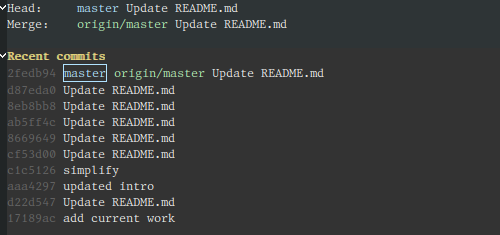
Key |
Meaning |
|---|---|
|
open Magit interface |
|
close current buffer |
|
abort current operation |
Basic Operations
The most important activities in git revolve around staging, committing, and pushing your edits.
New and Unstaged Changes
Magit lists new files under Untracked files. It lists edited files under Unstaged changes.
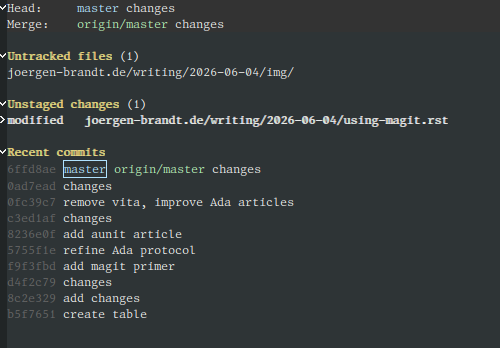
Key |
Meaning |
|---|---|
|
stage file |
|
kill changes |
Staged Changes
After changes are staged, we commit them.
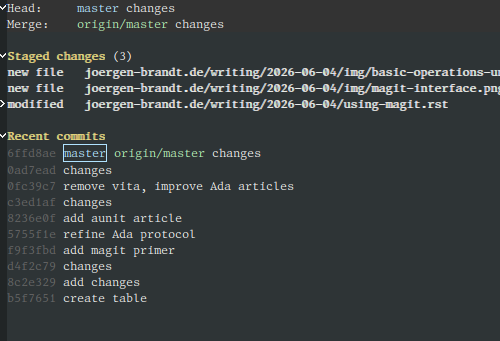
Key |
Meaning |
|---|---|
|
commit staged changes |
|
unstage |
Commit
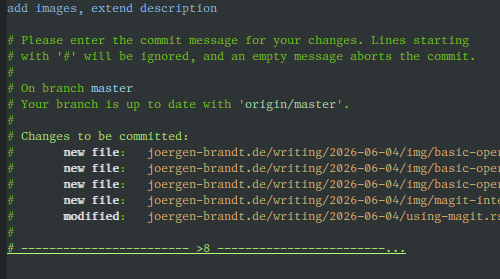
Key |
Meaning |
|---|---|
|
commit with message |
Push to Origin
Key |
Meaning |
|---|---|
|
push to origin |
Pull and Fetch from Origin
Key |
Meaning |
|---|---|
|
pull from origin |
|
fetch from origin |
Managing Branches
Create a New Branch
Key |
Meaning |
|---|---|
|
create a new branch at current branch |
|
push to origin |
Squash Commits
Key |
Meaning |
|---|---|
|
interactive rebase |
|
mark commit to keep |
|
mark commit to fixup (will vanish) |
|
force-push to origin |
Rebase and Resolve Conflicts
Key |
Meaning |
|---|---|
|
fetch changes |
|
rebase up to selected commit |
Synchronize with Upstream Repository
Key |
Meaning |
|---|---|
|
add remote “upstream” |
|
fetch changes from all sites |
|
rebase onto upstream branch |
|
force-push to origin |